
Virtual Server
Virtual Servers Optimized for Cloud Computing
Overview


-
Simplified Computing Environment Configuration
Using a web-based console, users can easily provision Virtual Servers, manage resources and manage costs. If necessary, the capacity of key resources such as CPU and memory can be scaled in or out while using Virtual Servers by modifying Virtual Server specifications.
-
Various Service Types
Virtualized vCore/memory resources are provided based on the typical server specifications, and master OS images of various types are also offered.
• Standard : Generally used computing spec(up to 16vCore, 256GB)
• High capacity : Provide more resources than regular specific resources -
Strong Security
Virtual Servers are securely protected by inbound/outbound traffic control with external Internet or other VPC(Virtual Private Cloud) through Security Group service. Real-time monitoring also support reliable operation of computing resources.
-
Optimized Cost
It is easy to create/terminate the server as needed, and it is cost-efficient since users are charged based on their actual usage.
Service Architecture
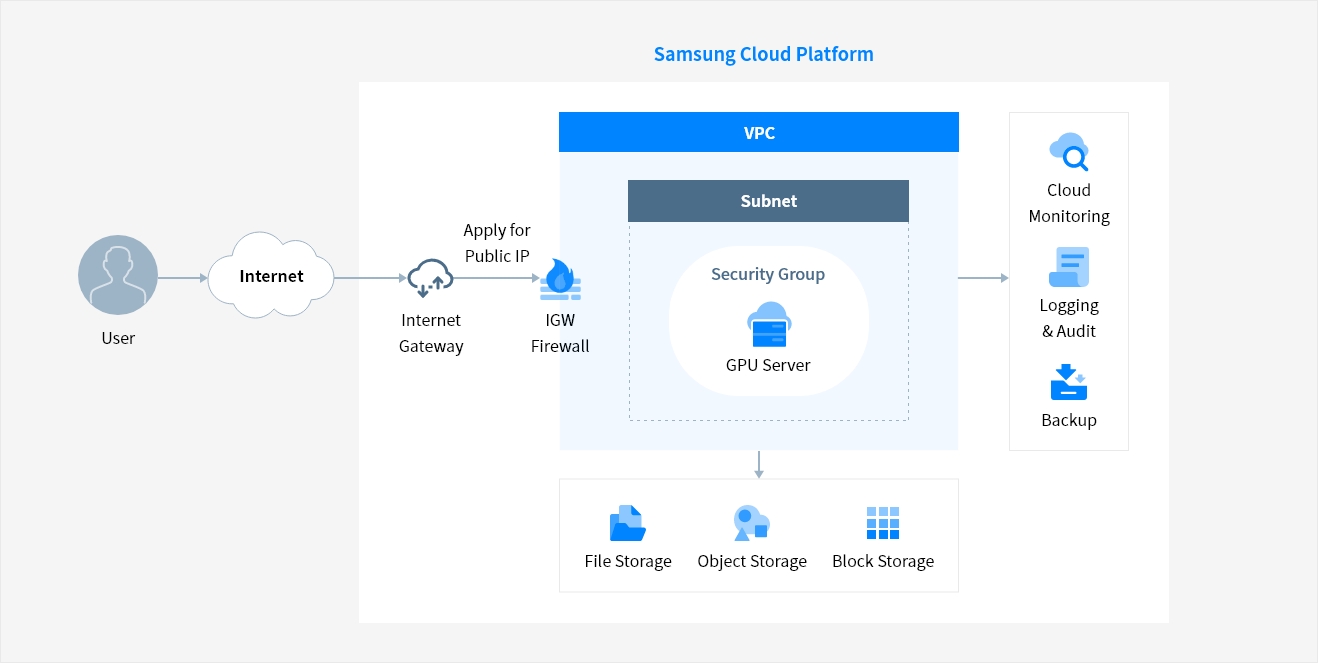
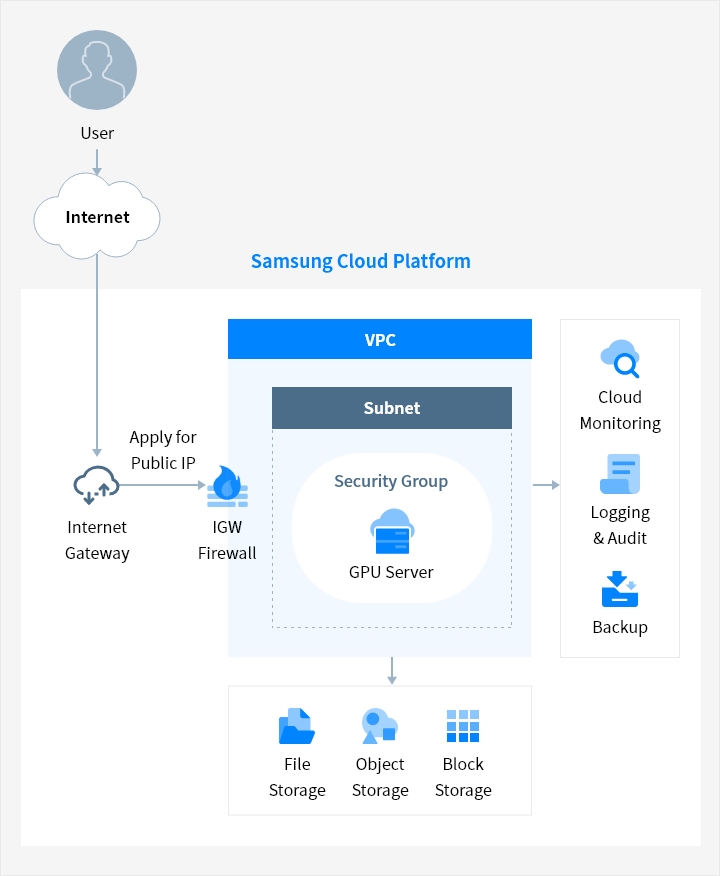
Samsung Cloud Platform Internet Gateway → (Apply for Public IP) → IGW Firewall → VPC → [Cloud Monitoring, Logging and audit, Backup]
VPC → [File Storage, Object Storage, Block Storage]
VPC : Subnet [Security Group - GPU - GPU Server]
Service Architecture diagram for Samsung Cloud Platform. A user connects via the Internet to an Internet Gateway, which applies for a Public IP and routes traffic through an IGW Firewall into a VPC. Within the VPC, a Subnet contains a Security Group housing a GPU Server. The GPU Server connects downward to three storage options — File Storage, Object Storage, and Block Storage — and outward to three management services: Cloud Monitoring, Logging Audit, and Backup
Key Features
-
Virtual Server creation/management
- Select Virtual Server for work type and required spec(standard or high capacity)
- Offer various OS types and standard images for creating resources conveniently
- Securely connect to the OS using key pairs
-
Storage and network connection
- Provide additional storage besides OS disk
- Set up subnet/IP and enable the use/turn off NAT IP setting
- Providing a connection to local subnets for communication between servers
- Provide Security Group integration setting
-
Convenient service management
- Modifying Virtual Server specs, and managing creation/changes in init script and tag
- Creating custom images and replicating them between accounts
- Deploying Virtual Server distributed/near approach through server group


Whether you’re looking for a specific business solution or just need some questions answered, we’re here to help