
Nexprime HCM Payroll

A SaaS Payroll solution developed by HCM* experts and verified by Samsung

* HCM: Human Capital Management

Create values for your organization with Samsung-verified payroll solution.

By easily connecting with global HCM solutions such as Workday, Nexprime HCM Payroll provides SaaS-based services for accurate payroll task handling based on flexible and powerful verification features.
Samsung SDS payroll experts have extensive experience and capabilities to provide the payroll solution to customers in various industries. They offer the best solution, ranging from consulting to service operations, helping customers successfully adopt an innovative payroll solution and create values.
Why Nexprime
HCM Payroll solution?
Having trouble managing payroll? Try out Nexprime HCM Payroll solution!

Find out know-how that encapsulates knowledge of the best-in-class experts. Utilize a SaaS payroll solution developed by experts in developing and operating Samsung affiliates' payroll systems,
allowing each overseas subsidiary to manage payroll separately.

Discover a comprehensive payroll management service,
covering process improvement, implementation, operations, and technical supports.
Experience fast and accurate payroll management through features to manage various payroll systems and strong calculation criteria and to verify the results.
SaaS Solution Nexprime HCM Payroll - [Standard Oayroll System Management, Easy and Flexible Payroll Criteria Management, Verificatoin of payroll calculatoin, support for systematic year-end tax settlement, powerful system intergration]]

Video

Payroll management matters. Meet the Nexprime HCM Payroll solution!

00

00

Webinar

01

Samsung SDS' SaaS Payroll Solution,
Nexprime HCM Payroll Webinar

Your answer to efficient payroll management -- Nexprime HCM Payroll, a SaaS payroll solution for enterprise!

Key Advantages

Payroll System Standards Management
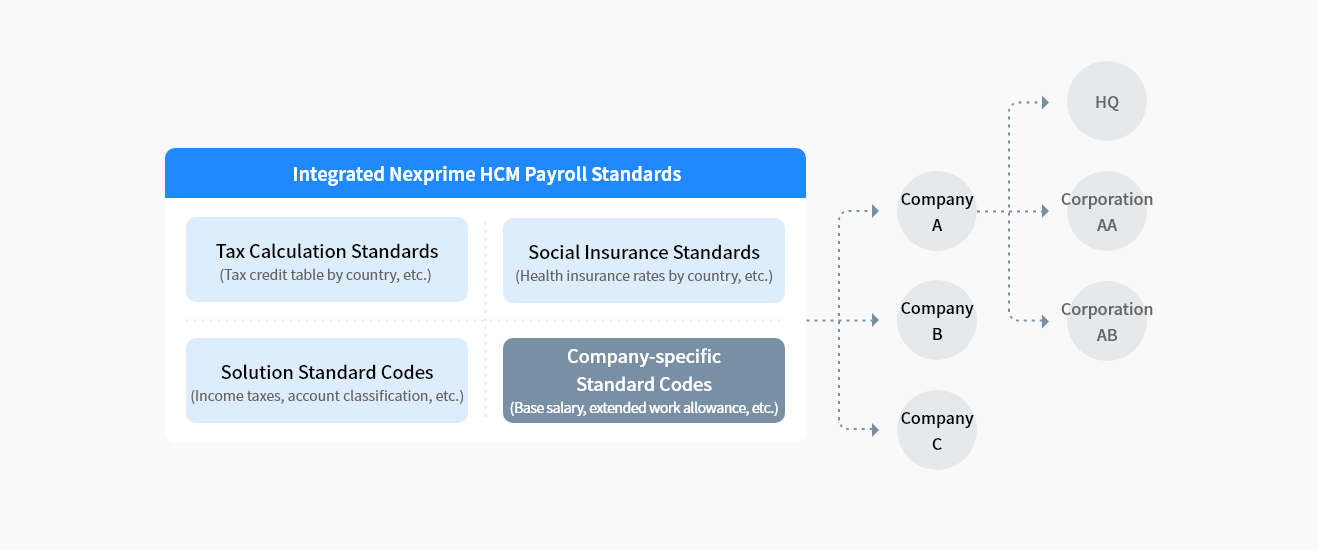
We offer an integrated standard information system to manage legal standards by country, standard codes, and others, enabling quick and reliable adjustments and operation management.

This diagram illustrates the structure of Integrated Nexprime HCM Payroll Standards. The left section is a blue-bordered box titled “Integrated Nexprime HCM Payroll Standards,” containing four sub-categories arranged in a 2×2 grid: (1) Tax Calculation Standards — includes tax credit tables by country; (2) Social Insurance Standards — includes health insurance rates by country; (3) Solution Standard Codes — covers income taxes and account classification; (4) Company-specific Standard Codes — covers base salary and extended work allowance. Dashed arrows flow rightward from this box to three companies: Company A, Company B, and Company C. Company A further connects to HQ (upper right) and Corporation AA (right). Company B connects to Corporation AB (right). Company C has no sub-corporation shown. The overall structure represents a parent standard applied across a multi-company, multi-corporation payroll hierarchy.
Easy and Flexible Payroll Criteria Management
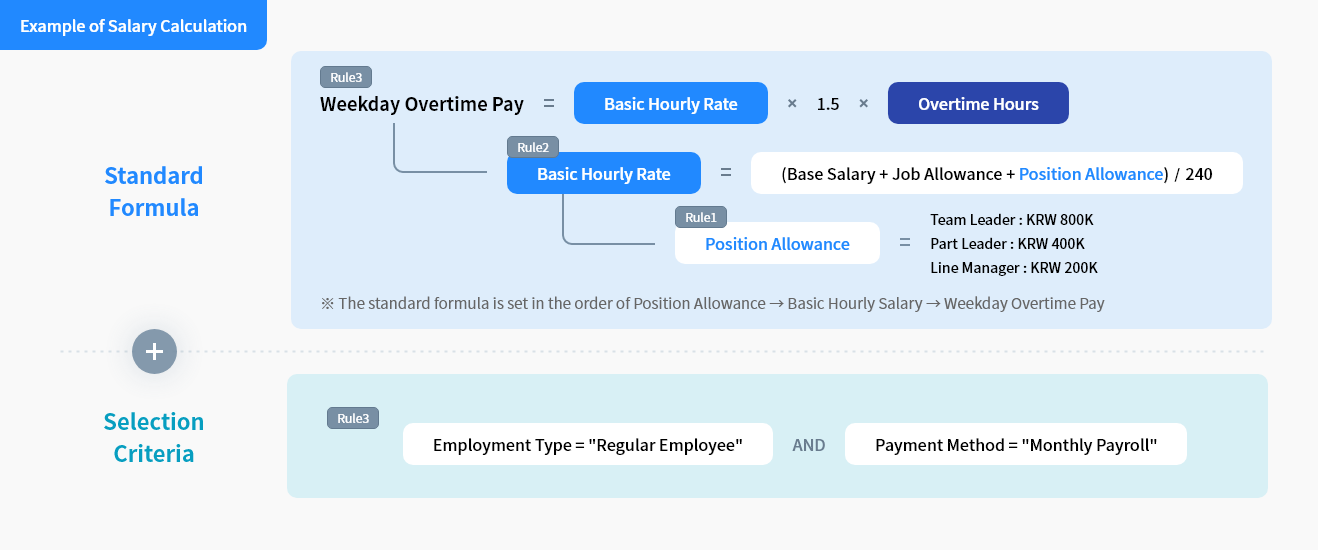
Using the rule-based payroll calculation logic, you can easily manage various criteria for payroll calculation without system development or consulting.

This infographic presents a cascading salary calculation example titled “Example of Salary Calculation,” divided into two sections: Section 1 — Standard Formula (three nested rules set in bottom-up order): Rule 1: Position Allowance equals fixed amounts by role — Team Leader: KRW 800,000; Part Leader: KRW 400,000; Line Manager: KRW 200,000. Rule 2: Basic Hourly Rate equals (Base Salary + Job Allowance + Position Allowance) divided by 240. Rule 3: Weekday Overtime Pay equals Basic Hourly Rate multiplied by 1.5 multiplied by Overtime Hours. A footnote states: “The standard formula is set in the order of Position Allowance → Basic Hourly Salary → Weekday Overtime Pay.” Section 2 — Selection Criteria (Rule 3 condition): The rule applies when: Employment Type equals “Regular Employee” AND Payment Method equals “Monthly Payroll.”
Support for Accurate Payroll Verification
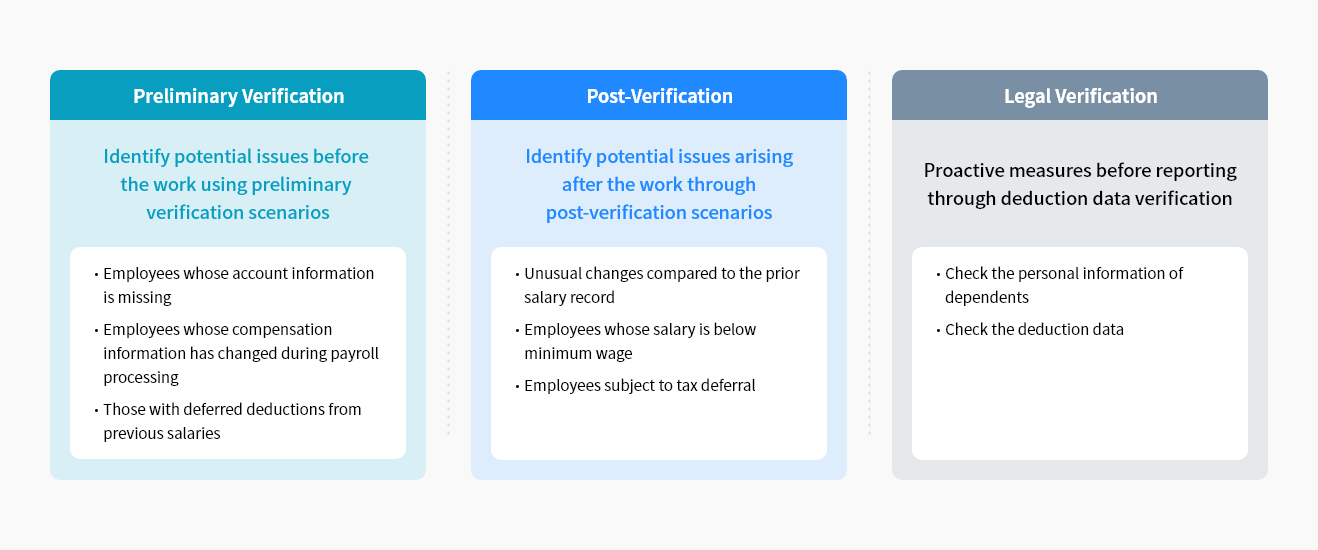
Based on our long years of operating experience, we offer various scenarios where you can find what items to verify so that you can validate materials and work processes used for salary calculation and payment and fix errors.

This diagram shows three payroll verification types presented in equal-width columns: Column 1 — Preliminary Verification (teal header): Purpose: Identify potential issues before the work using preliminary verification scenarios. Check items: · Employees whose account information is missing; · Employees whose compensation information has changed during payroll processing; · Those with deferred deductions from previous salaries. Column 2 — Post-Verification (blue header): Purpose: Identify potential issues arising after the work through post-verification scenarios. Check items: · Unusual changes compared to the prior salary record; · Employees whose salary is below minimum wage; · Employees subject to tax deferral. Column 3 — Legal Verification (gray header): Purpose: Proactive measures before reporting through deduction data verification. Check items: · Check the personal information of dependents; · Check the deduction data.
Systematic Year-end Tax Settlement Support
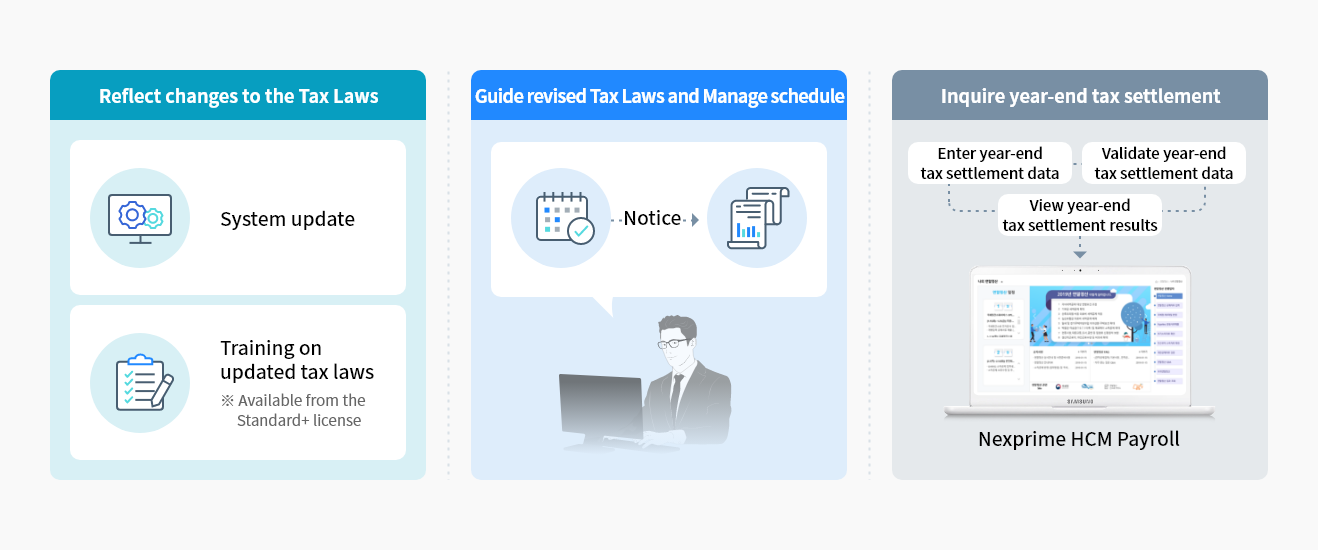
Changes to the Tax Laws for Year-end Settlement are automatically reflected in the system, and relevant training materials will be given to PICs of year-end tax settlement. Employees can easily upload electronic documents, while the PICs can save time and costs from streamlined tasks.

This infographic consists of three panels describing tax-related features of Nexprime HCM Payroll: Panel 1 — Reflect changes to the Tax Laws (blue-bordered box): Two items are listed, each with an icon: · System update — represented by a monitor with a gear icon; · Training on updated tax laws — represented by a checklist icon. Note: Available from the Standard+ license. Panel 2 — Guide revised Tax Laws and Manage schedule: A workflow illustration shows a calendar icon connected via “Notice” arrow to a chart/document icon, while a professional figure (illustrated person at a computer) reviews the notification. Panel 3 — Inquire year-end tax settlement: A laptop screen displaying the Nexprime HCM Payroll interface is shown, surrounded by three labeled steps in a circular flow: 1. Enter year-end tax settlement data; 1. Validate year-end tax settlement data; 1. View year-end tax settlement results.
Robust System Integration
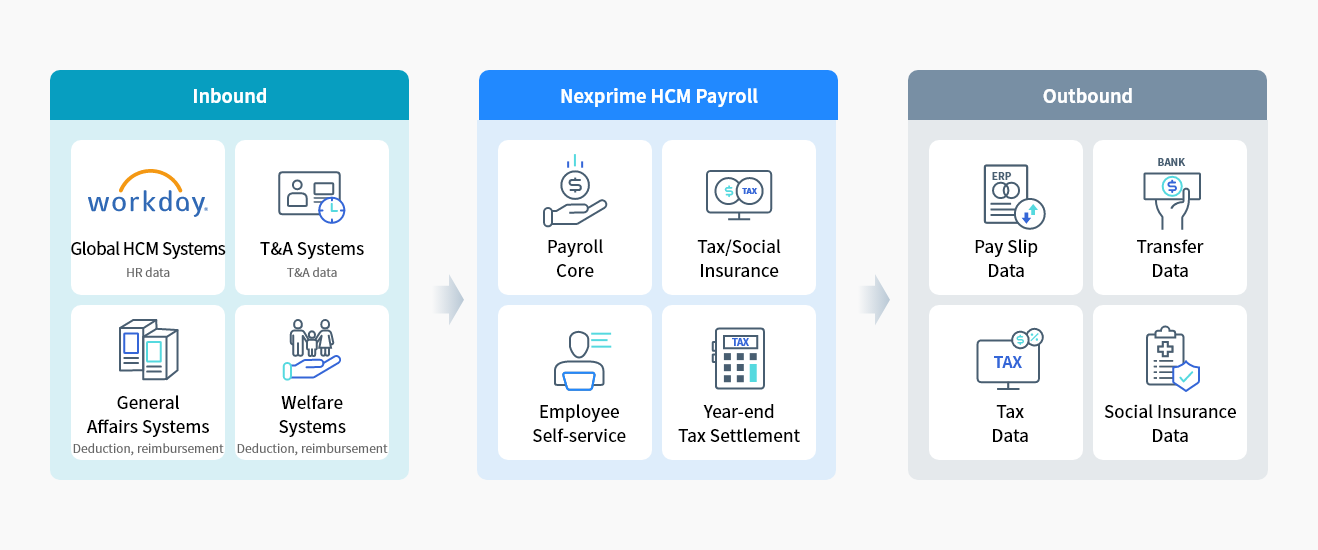
Our solution offers standard features for seamless data integration with global HCM platforms like Workday and payroll and other T&A systems, driving task automation and optimizing attendance management.

This system integration diagram is divided into three vertical columns connected by rightward arrows: Left column — Inbound (teal header): Four source systems are shown in a 2×2 grid: · Global HCM Systems (e.g., Workday) — provides HR data; · T&A Systems — provides Time and Attendance data; · General Affairs Systems — provides deduction and reimbursement data; · Welfare Systems — provides deduction and reimbursement data. Center column — Nexprime HCM Payroll (blue header): Four core functional modules in a 2×2 grid: · Payroll Core; · Tax / Social Insurance; · Employee Self-service; · Year-end Tax Settlement. Right column — Outbound (gray header): Four output data types in a 2×2 grid: · Pay Slip Data (connected to ERP); · Transfer Data (connected to Bank); · Tax Data; · Social Insurance Data. The left-to-center and center-to-right transitions are indicated by large solid rightward arrows, representing data flow direction.

Support Plan

Nexprime HCM Support Plan offers services categorized into Standard and Standard+ grades.

  • Standard grade included as a basic option
  • Standard+ grade offers specialized operational support services and additional training

FAQs

  • Companies not adopting Workday solutions can also use Nexprime HCM solutions.
    We offer dedicated connectors to connect Nexprime HCM seamlessly with Workday solutions and the standard REST API required to integrate HR data from various HR systems.

  • Nexprime HCM solution offers payroll management and time and attendance management features.
    Those two are optimized for Nexprime HCM environments, so it is recommended to introduce both of them.
    However, it is possible to adopt only necessary solutions suited to each business circumstance.

  • Nexprime HCM Payroll provides a retroactive feature based on personnel transfer and salary/absence information updates. If salary confirmation is delayed due to late salary negotiation, a retroactive payment can be made by designating the corresponding period.

  • Changes in policies such as tax laws or insurance premium rates are automatically reflected in the system and informed to users, helping them perform payroll and settlement processes efficiently.

  • Users can proceed with payroll processing simultaneously upon their authority (corporation, division, office, etc.), thereby increasing work efficiency.

Let's talk

Whether you’re looking for a specific business solution or just need some questions answered, we’re here to help