
Endpoint Security

PC Data Leak Prevention, Document Security, and Vulnerability Management Solution

Are you worried that your proprietary technology or core information asset might leak?
Is your core information exposed to unauthorized users or do you need a systemic response mechanism?

Endpoint Security provides essential security features such as information leakage prevention, malicious code protection, document security, and print control.

Manage your complex security posture easily and securely with Endpoint Security leveraging Samsung SDS' endpoint security operational know-how.
What makes Samsung SDS Endpoint Security special?
Systematically protect and manage your enterprise endpoints in the contactless era!

• Years of Endpoint Security Experience

  • For over 25 years, Samsung SDS has managed the security of 490,000 PCs for Samsung affiliates worldwide and 290,000 PCs for 174 customer companies. Our proven expertise ensures a reliable working environment against hidden security threats.

• Global Technical Support System

  • Samsung SDS operates its own Global Technical Support system, with technical support centers located at six major hubs around the world. We provide 24/7 technical support in multiple languages, ensuring that customers receive assistance anytime, anywhere.

• Competitive Price

  • Backed by years of solution experience, we reduce costs and provide our Endpoint Security solution at a competitive price, making adoption more affordable for your business.
Circular hub-and-spoke diagram on a dark blue background illustrating the four core strengths of Samsung SDS Endpoint Security. The center circle displays the label "Samsung SDS Endpoint Security." Four satellite nodes are connected to the center by dotted lines, positioned at the top, right, bottom, and left respectively. Top: Verified, Reliable Solution. Right: Global Support System. Bottom: Competitive Price. Left: Extensive Business Experience.
Endpoint Security PC image
Endpoint Security Mobile image
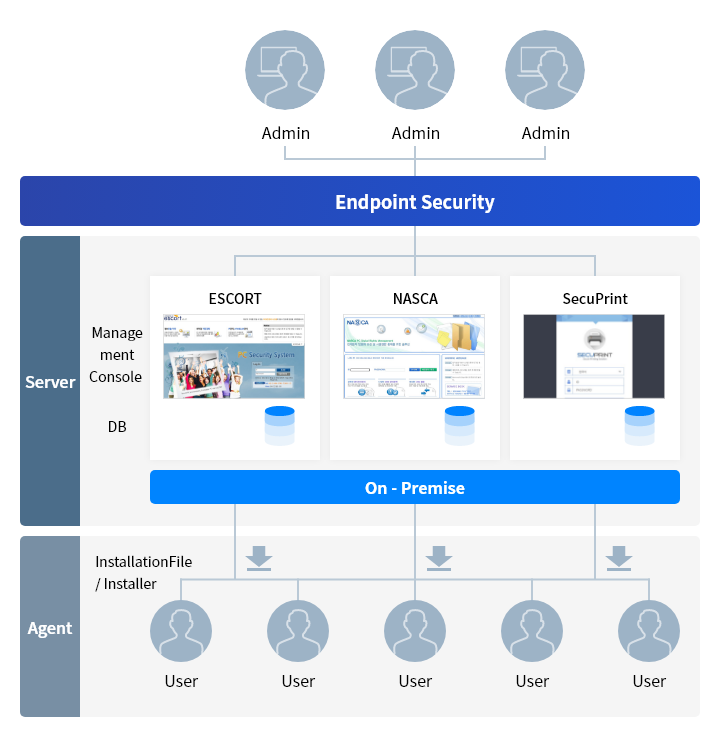
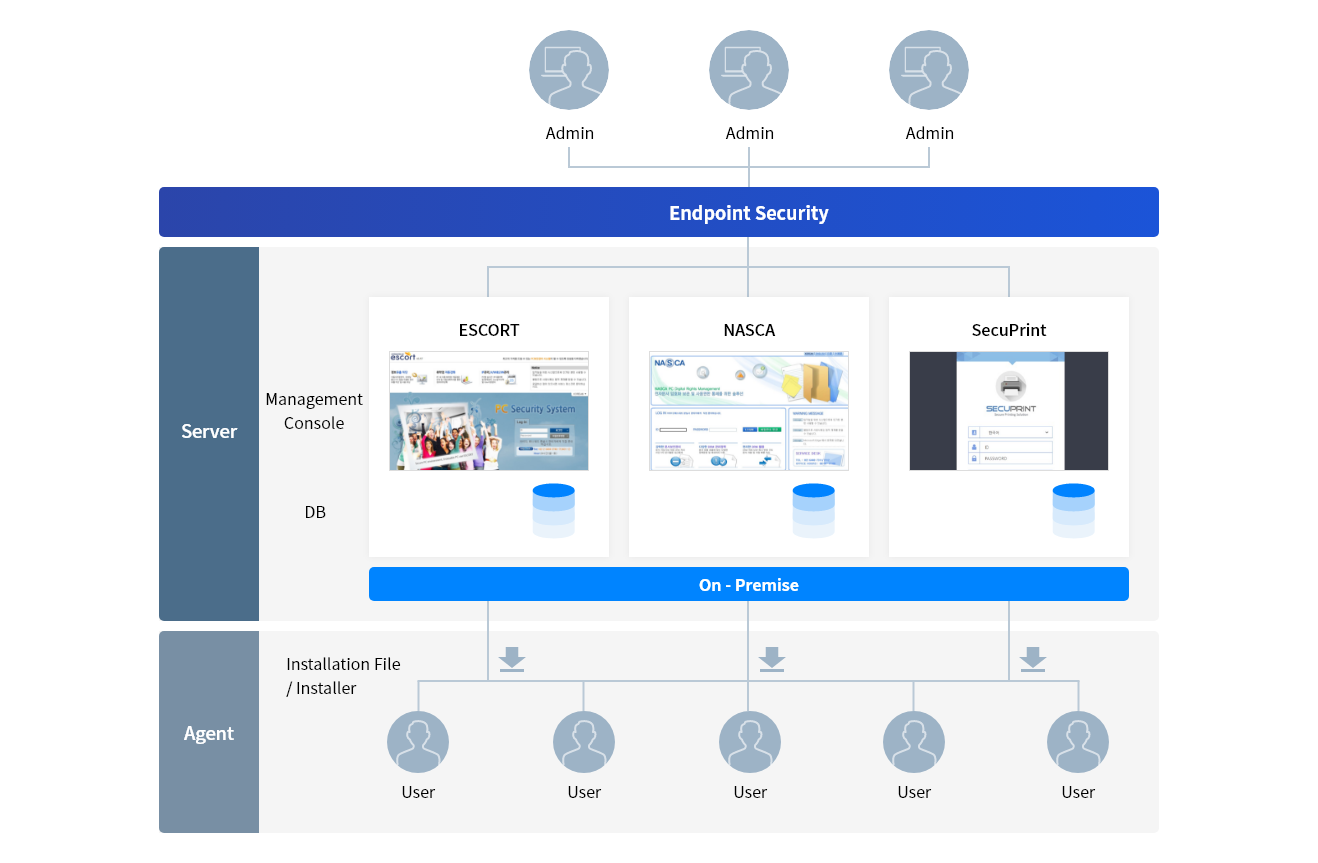
Endpoint Security를 설명하는 이미지
관리자들
Endpoint Security
서버 관리콘솔 ESCORT NASCA SecuPrint
DB ESCORT DB NASCA DB SecuPrint DB
에이전트 설치파일 사용자들

Key Features

01
Device Control

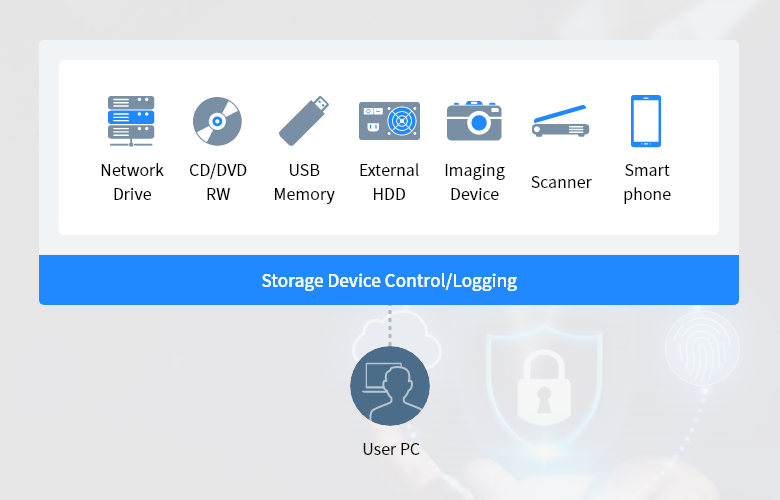
Diagram illustrating storage device control and logging functionality. The upper section displays icons and labels for seven device types subject to control: Network Drive, CD/DVD RW, USB Memory, External HDD, Imaging Device, Scanner, and Smartphone. A blue horizontal banner labeled "Storage Device Control/Logging" spans the width below the device icons, representing the control layer. Below the banner, a dashed vertical line connects downward to an icon labeled "User PC," indicating that all listed storage devices are monitored and controlled at the user endpoint level.

Endpoint Security helps efficient management and control of all storage devices connected to your PC, including USB memory, external hard drives, and network drives. It also provides robust control over devices that can be connected via wired or wireless interfaces, such as cameras, scanners, and smartphones, which could potentially be exploited as data leakage channels.

Document Security Management

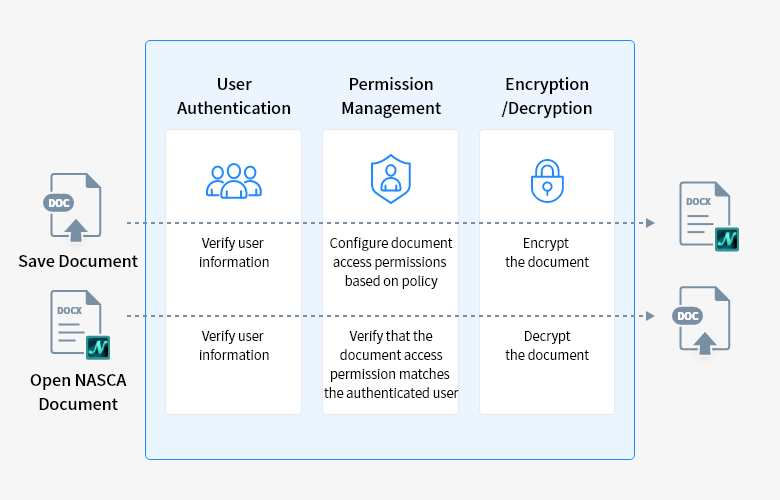
Flowchart illustrating two document security workflows processed through three sequential stages enclosed in a blue-bordered panel. The three stages are: User Authentication, Permission Management, and Encryption/Decryption. Top workflow – Save Document: A plain DOC file on the left enters the process. Stage 1 verifies user information. Stage 2 configures document access permissions based on policy. Stage 3 encrypts the document. The output on the right is an encrypted NASCA document (DOCX with NASCA badge). Bottom workflow – Open NASCA Document: An encrypted NASCA document on the left enters the process. Stage 1 verifies user information. Stage 2 verifies that the document access permission matches the authenticated user. Stage 3 decrypts the document. The output on the right is a plain accessible DOC file.

Endpoint Security encrypts all documents created on the PC to transfer them. It also controls document access rights and prevents data leaks through document encryption and decryption.

Printing Control

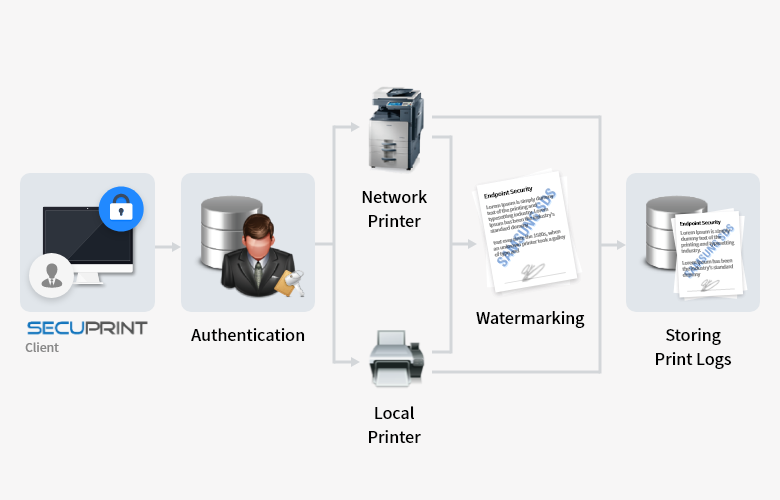
Horizontal flowchart illustrating the SecuPrint secure printing process across five stages connected by arrows. Stage 1 – SecuPrint Client: A computer monitor with a lock icon and the SecuPrint logo represents the user's endpoint where the print job originates. Stage 2 – Authentication: A suited figure holding an envelope beside a database icon represents the user authentication step. Stage 3 – Printer Selection: The authenticated job is routed to either a Network Printer (multifunction copier, upper path) or a Local Printer (desktop printer, lower path). Stage 4 – Watermarking: Printed documents are stamped with a "SAMSUNG SDS" watermark, as shown by sample document images with diagonal watermark text. Stage 5 – Storing Print Logs: The watermarked documents are stored alongside a database icon, representing secure print log archiving for audit and compliance purposes.

Endpoint Security prevents data leakage from printed documents through printing control such as print watermarks, print policies setting for groups, departments, or individuals, and tracking of print usage history.

Use Cases

    FAQs

    • Endpoint Security is an on-premises solution that includes ESCORT (which blocks internal data leaks), NASCA (which provides electronic document encryption and manages user permissions for documents), and SecuPrint (which offers print control and screen watermark feature).

    • Please submit an inquiry through the "Get in Touch" at the bottom of the current page. Our Account Manager (AM) will review your request and reach out to you using the contact information you provided to proceed with the consultation.

    • Depending on the customer's situation, it takes about 1 to 3 months. During this period, a customer environment is assessed, a server is installed, agents are deployed, and pilot testing and function checks are performed.

    Let’s talk

    Whether you’re looking for a specific business solution or just need some questions answered, we’re here to help