

Brity Copilot

Generative AI-based Collaboration solution

Transform the way you work with Brity Copilot,
the cutting-edge generative AI that streamlines communication
and boosts productivity in your company

Can companies improve productivity through generative AI?
What is the most frequently used service by employees throughout the day?

For effective integration of generative AI in a business, it is crucial to comprehend and leverage the intricate relationships, systems, and diverse knowledge information within the company.

Experience Brity Copilot, an easiest way to start generative AI at workplace.
What makes Samsung SDS
Brity Copilot special?
Seamless usability
Utilize generative AI effortlessly across mail, messenger, meeting and drive
Clear Communication
Benefit from accurate voice recognition, live captions, and meeting minutes.
Robust Security
Secure environment with keyword filtering and data access management.
Diagram on a dark navy background illustrating the product composition of Brity Copilot. The upper section, labeled "Brity Works," contains four app icons arranged in a two-by-two grid: Mail (envelope icon), Messenger (chat bubble icon), Meeting (video camera icon), and Drive (folder icon). A plus sign below the Brity Works panel connects to a lower section labeled "Gen AI," which contains the Brity Copilot logo — a blue triangular icon — alongside the product name "Brity Copilot." The layout conveys that Brity Copilot is the result of combining the Brity Works collaboration suite with Generative AI capabilities.
Revolutionize the way your company works with Brity Works,
now supercharged with generative AI, Brity Copilot !
Unlock a new era of collaborative innovation and transform the future of work.

Features
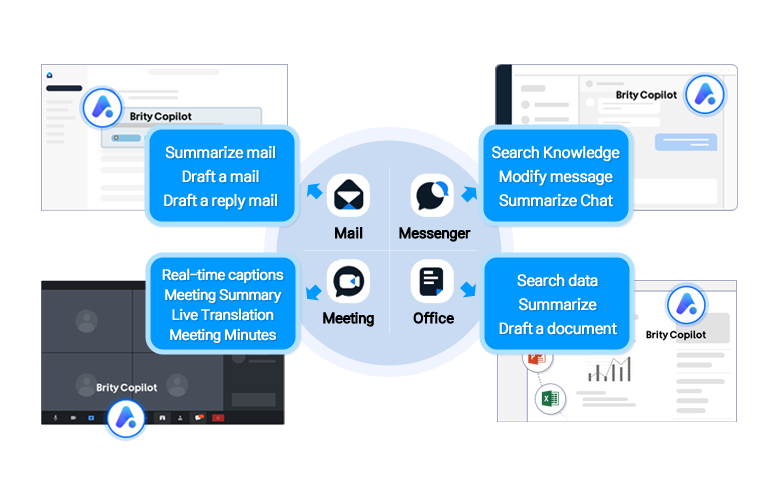
01
Seamless usability

Hub-and-spoke diagram illustrating Brity Copilot AI capabilities across four application areas. A central circle contains icons for four apps: Mail, Messenger, Meeting, and Office. Each app connects via arrows to a callout box listing its AI features. Mail (upper left): Summarize mail, Draft a mail, Draft a reply mail. A screenshot of the Brity Copilot mail interface is shown in the background. Messenger (upper right): Search Knowledge, Modify message, Summarize Chat. A screenshot of the Brity Copilot messenger interface is shown in the background. Meeting (lower left): Real-time captions, Meeting Summary, Live Translation, Meeting Minutes. A screenshot of a video meeting interface with Brity Copilot active is shown in the background. Office (lower right): Search data, Summarize, Draft a document. A screenshot of the Brity Copilot office interface with spreadsheet and presentation thumbnails is shown in the background.

You can immediately use Copilot from any work situation, whether it's email, messenger, meeting, or Office tool, to make your work more efficient and smart. Experience the convenience of generative AI across all Brity Works services.
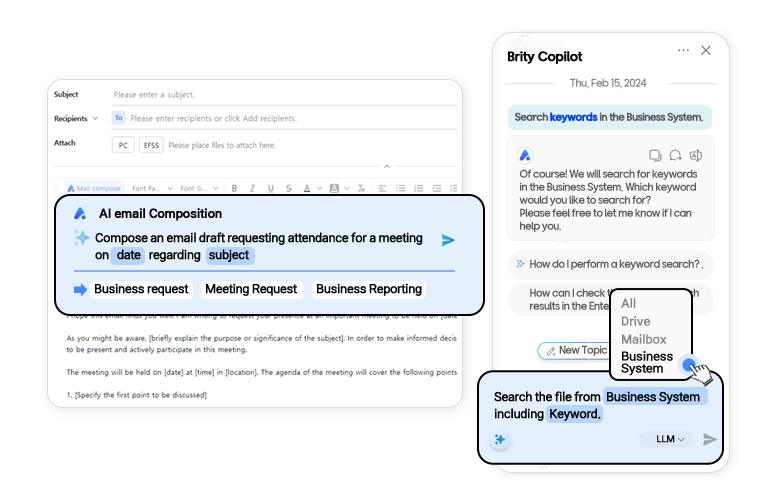
User friendly interface and guide prompts

1. 사내공유 -공유멤버를 폴더에 추가하면 하위 폴더와 하위 파일에도 공유 멤버가 추가됩니다. 선택한 항목, 사내 링크, 링크 복사, 내 권한 제거, 공유멤버, 복사가능 조회가능 편집가능 공유가능 2. 사외공유 - 새 사외 공유 링크 버전정보 버전 1 링크 만료일 다운로드 횟수 비밀번호 비밀번호 입력 비밀번호는 4글자 이상이어야 합니다 사외 공유 링크를 통해 외부에서도 파일을 다운로드 할 수 있게 됩니다. 중요한 자료가 유출되지 않도록 보안에 유의해 주세요.

Screenshot composite showing two Brity Copilot UI features in use. Left panel – AI Email Composition: A mail compose window is open with fields for Subject, Recipients, and Attach. An overlay panel labeled "AI email Composition" shows a prompt: "Compose an email draft requesting attendance for a meeting on date regarding subject," with quick-select template buttons for Business Request, Meeting Request, and Business Reporting. A partially drafted email body is visible below. Right panel – Brity Copilot Chat (Knowledge Search): A chat panel dated Thursday, February 15, 2024 shows a conversation in which the user requests to "Search keywords in the Business System." Brity Copilot responds by asking which keyword to search for. A follow-up query asks how to perform a keyword search and how to check results in the Enterprise system. A dropdown menu appears with search scope options: All, Drive, Mailbox, and Business System (highlighted). A callout at the bottom reads: "Search the file from Business System including Keyword."

We provide a variety of recommended prompts and chip menu-type that are easy to use so that even users with little experience using generative AI can get the answers and results they want.
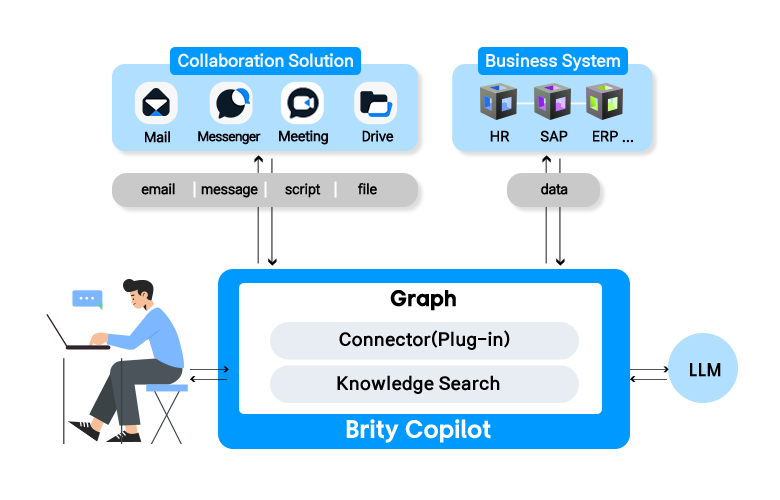
Integration with business systems

System architecture diagram illustrating the technical structure of Brity Copilot. At the top left, a box labeled "Collaboration Solution" contains icons for four apps: Mail, Messenger, Meeting, and Drive. These feed data types — email, message, script, and file — downward into the central Brity Copilot engine. At the top right, a box labeled "Business System" contains icons for HR, SAP, and ERP systems. These feed "data" downward into the same central engine. The central blue-bordered box represents Brity Copilot, which contains a "Graph" layer comprising two components: Connector (Plug-in) and Knowledge Search. On the left, an illustration of a person working at a laptop sends queries to and receives responses from Brity Copilot via bidirectional arrows. On the right, Brity Copilot connects bidirectionally to an "LLM" node (represented as a blue circle), indicating that large language model inference powers the AI responses.

It is possible to conveniently perform an integrated search through the copilot by linking internal data (mail, message, document, and company's business system data) that cannot be found through external search in the form of a plug-in.

* Please inquire separately.
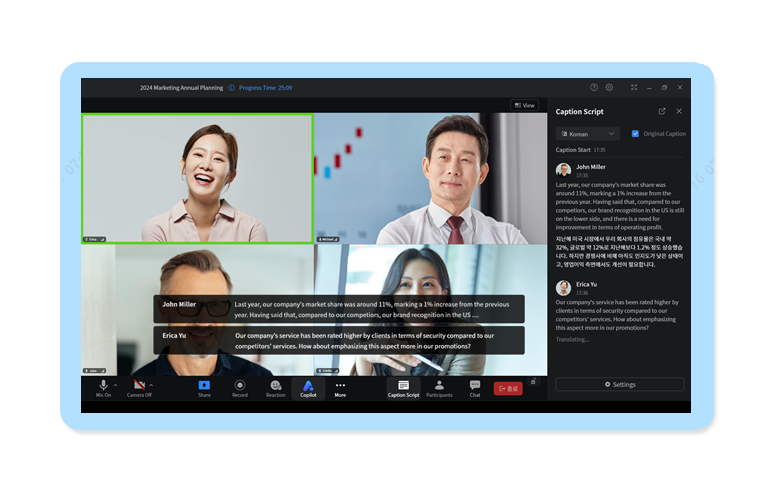
Barrier-free meeting

Screenshot of a Brity Meeting video conference session titled "2024 Marketing Annual Planning" with a progress time of 25:09. Four participants are visible in video tiles: a smiling woman (highlighted with a green active-speaker border), a man in a suit, a man in the foreground, and a woman in the background. At the bottom of the video area, real-time caption subtitles display two speakers' statements: - John Miller: "Last year, our company's market share was around 11%, marking a 1% increase from the previous year. Having said that, compared to our competition, our brand recognition in the US —" - Erica Yu: "Our company's service has been rated higher by clients in terms of security compared to our competitors' services. How about emphasizing this aspect more in our promotions?" On the right side, a "Caption Script" panel is open with Korean selected as the translation language and "Original Caption" checkbox enabled. The panel shows timestamped transcripts for both John Miller and Erica Yu, with John Miller's speech translated into Korean below the original English text. Erica Yu's entry shows "Translating…" indicating live translation in progress. A toolbar at the bottom includes controls for Mic, Camera, Share, Record, Reaction, Copilot, More, Caption Script, Participants, Chat, and an End button.

Brity Copilot provides real-time captions based on STT technology, with a Korean recognition rate of over 94%. It also generates meeting summaries or summaries of specific remarks, and answers questions based on the meeting conversation. After the meeting, minutes are automatically generated and shared via email.
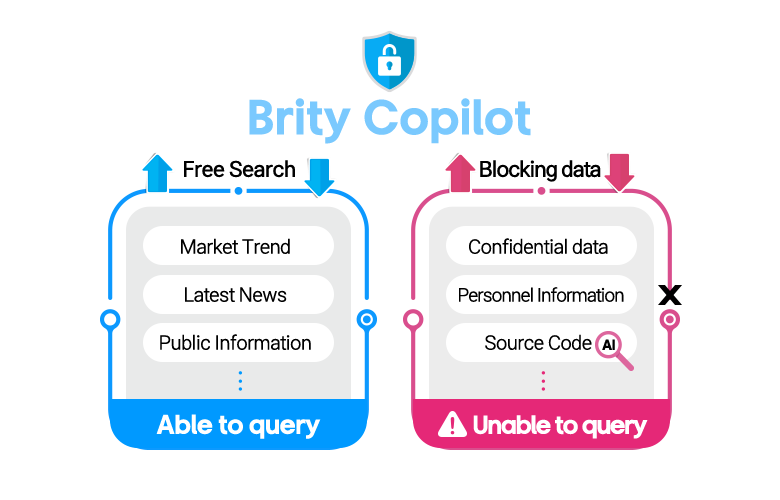
Security features for generative AI

Diagram illustrating Brity Copilot's data access control policy, with a shield-and-lock icon and the "Brity Copilot" title at the top center. Left panel – Able to query (blue): Labeled "Free Search" with a bidirectional blue arrow indicating open data flow. Lists three types of queryable information: Market Trend, Latest News, and Public Information, followed by an ellipsis indicating additional items. The panel footer reads "Able to query" on a blue background. Right panel – Unable to query (pink/red): Labeled "Blocking data" with a downward pink arrow indicating restricted outbound flow. Lists three types of blocked information: Confidential data, Personnel Information, and Source Code (marked with an AI badge and a search icon with an X). The panel footer reads "Unable to query" with a warning triangle icon on a pink background, signifying that sensitive enterprise data is prevented from being sent to the AI model.

We block internal key information or source code input automatically through keyword and message pattern analysis to safely protect internal information. Furthermore, our user authority management features enable individual and department-level access control for internal data.

Price Plan

Brity Copilot

An easiest way to start generative AI at workplace.

Basic Plan Table : Brity Copilot(for Mail, Messenger, Drive, Office add-in), Brity Copilot (for Meeting)
Brity Copilot (for Mail, Messenger, Drive, Office add-in) Brity Copilot (for Meeting)
20,000KRW User/month

A generative AI service that provide seamless usability by providing copilot service directly from mail, messenger, drive, and office.

12,000KRW User/month

A generative AI based meeting service that provides real-time captions and translations during meetings, as well as Q&A for meeting content.
After the meeting, the minutes are automatically generated.

Key Features Key Features
  • LLM (GPT-4o mini) based service
  • Chat summarization from messenger
  • Message generation and style modification, Spell check
  • Email summarization, draft generation, and translation
  • Automatic email response generation
  • Summarize documents and creat draft
  • LLM (GPT-4o mini) based service
  • Real-time speech caption (61 languages)
  • Transcription and live translation (21 languages)
  • Summarization of meeting content
  • Summarization of specific speaker’s remark
  • Extraction of action items
  • Meeting minutes draft
  • Brity Copilot is available for customers who are subscribed to the Brity Works paid plan. (Free plans are excluded)
  • VAT is not included.
  • If you would like to utilize different LLMs, please contact us for further inquiries.

Guideline

Resources

Learn more about Brity Copilot

Leaflet

Quick glance for Brity Copilot

FAQ

  • Yes, Brity Copilot is only available when using Brity Works. It's optimized for the Brity Works environment, so it can't be provided as an add-in to existing collaboration tools. However, it's possible to deploy it separately with each service. (messenger + copilot, meeting + copilot).

  • No, individual services can be deployed separately. For example, Messenger + Copilot or Meeting + Copilot can be introduced independently. However, functions that require inter-service connections, such as sharing meeting minutes to mail directly from the meeting website, may be limited.

  • The price of Brity Copilot varies depending on the size of the company and the scope of service adoption. For more details, please contact us.

  • Yes, Brity Works and Copilot are SaaS services that can be used immediately.

Let’s talk

Whether you’re looking for a specific business solution or just need some questions answered, we’re here to help